A Grad student (Jesse McDonald jamcd@hawaii.edu) here at UH is researching plagiarism in intro level CS courses, specifically detecting plagiarism. As such, he needs some organic data to evaluate the method. The purpose of this assignment alternative is to generate this data. This alternative assignment is completely optional, and if you do not feel comfortable participating in this research, you do not have and can do the regular assignment 13 instead. Be sure to read the included Informed Consent document. If you have any questions, feel free to email jamcd@hawaii.edu
Processing is basically java, but the IDE handles the main class and function on its own. Instead you write a setup and draw function
		void setup(){
			//setup code here
		}

		void draw(){
		 	//draw code here
		}
The setup function gets called exactly once at the start of the program, but the draw code gets called 60 times every second.
I highly recommend you watch the setup video for a better guide, and the processing reference will likely also be quite useful.
Here is a video to help get you started. Note that the video includes a section on installation which should be optional since the IDE is on a thumbdrive.
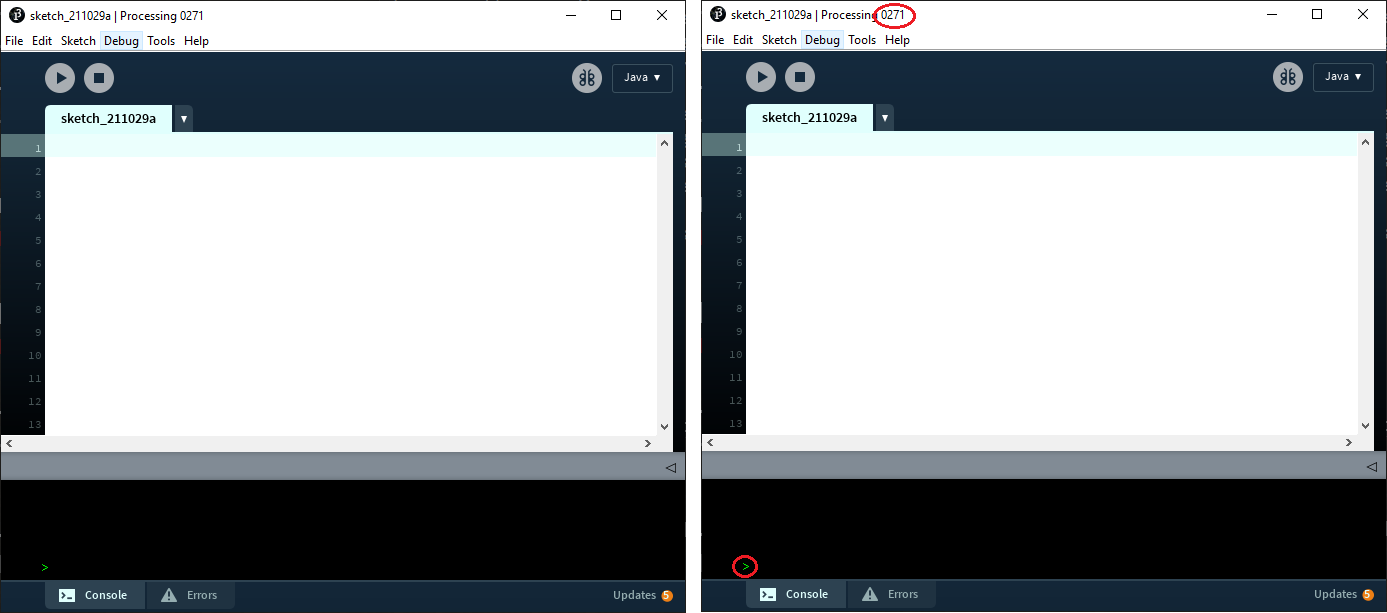
If you have any other versions of processing on your computer, make sure they are closed. The IDE that pops up should have 0271 in the top corner and a small green > down in the bottom left corner. If either of these are missing you are using the wrong version.
The reference should be quite useful and contains documentation on all of the functions Processing has available. Here are a few specific functions you may find useful for this assignment
note: (0,0) is the top left corner, and (width,height) is the bottom right corner
If you are having trouble Googling the IDE due to processing being a synonym for computing, try searching for "Processing3" instead.
For this Assignment you are to make code to draw a complex fractal in the IDE. The definition of fractal is.... complicated? So we are just going to ignore the definition of fractal, and instead we are going to use the commonly used but wrong definition "A fractal is anything that is self-similar forever, no matter how far you zoom in". (For an interesting video on why this is wrong and what a fractal really is, see 3 blue 1 Brown's video on it). The exact fractal or method is not specified, however it must be an equation defined fractal at least as complicated as the Mandelbrot set using the pixels array.
The Mandelbrot fractal is defined as all complex numbers c (dont panic, these "complex numbers" are justscreenX+i*screenY) where the function f(z)=z^2+c does not diverge ever when you repeatedly put the previous output in as z, starting with z=0. In practical terms, "ever" isn't possible to calculate, so people pick a number of generations and check if it has "diverged" within that number of generations. To check if a number has "diverged" they check if it is outside of a circle with radius of 2 since every number outside that radius DOES diverge. Often Mandelbrot fractals are colored, black is always pixels that do not diverge (with in the given iterations), but other pixels are colored based on how many iterations they take to cross the circle edge. Your program should be able to work for any integer number of iterations, but 100 to 1000 iterations are good for testing. If you want to learn more about the Mandelbrot set, there is a good numberphile and 3 Blue 1 Brown video on it. If the above description appears intimidating, watch one of these videos, they really help understand what it is doing, and how to program it.
Other fractals you may consider include:
Your program should be capable of drawing the fractal at any resolution (IE, if the screen gets bigger, draw a larger, more detailed fractal). The fractal you choose should also be defined by a specific function that has been ran for each pixel in the image. It should not be a recursive "replace all of X with Y" fractal such as Sierpinski_triangle.
Additionally, please write a brief summary of how you completed the assignment (ie, asked a friend, looked up an answer, just did it, etc) either as a comment at the top of your assignment or in a separate text document on the thumbdrive.
If the thumbdrive runs out of storage for some reason, you can feel free to delete the getting started video.
If you don't want to use the provided thumbdrive, you can install a copy of the IDE your self. To install the IDE follow these steps
Installation on windows is easy, first download the zipped IDE Processing-windows.zip and extract it. Then launch Processing.exe. That should be all that is needed, the IDE should launch directly with no other install process
On Mac it is slightly harder, but not much. Download the zipped app Processing-mac.zip MacOs should automatically extract this for you. Find the app in your downloads folder and right click it. In this menu select open. You will see a warning asking if you trust the software, click yes and it should launch immediately with no further install.
If you are on Linux and do not have access to either of those, Email jamcd@hawaii.edu for a Linux version